개요
System.arraycopy는 Java에서 배열을 고속으로 복사하기 위한 네이티브 메서드- JVM 레벨에서 메모리를 직접 복사하여 가장 빠른 배열 복사 성능 제공
java.lang.System클래스의 정적 메서드로 제공됨- C/C++ 기반으로 구현되어 일반 Java 메서드보다 훨씬 빠름
System.arraycopy 정의
네이티브 메서드란
- 네이티브 메서드 (Native Method)
- JVM 내부에서 C/C++로 직접 구현된 메서드
- Java 코드가 아닌 플랫폼별 네이티브 코드로 실행
native키워드로 선언됨- JNI (Java Native Interface)를 통해 호출
- 성능 이점
- Java 바이트코드 해석 과정 생략
- CPU 레벨의 최적화된 명령어 직접 사용
- 메모리 복사에 특화된 하드웨어 명령어 활용
System.arraycopy의 특징
- 메모리 직접 복사
- 메모리 블록 단위로 복사
- 반복문 없이 한 번에 처리
- 캐시 효율성이 높음
- 내부적으로
memcpy또는memmove호출- C 표준 라이브러리의 메모리 복사 함수
- 중첩 범위 처리 시
memmove사용
- CPU SIMD 명령어 활용 가능
- Single Instruction, Multiple Data
- 한 번의 명령으로 여러 데이터 동시 처리
- 복사 속도 극대화
- 타입 안전성 보장
- 호환되지 않는 타입 간 복사 시
ArrayStoreException발생 - 컴파일 타임이 아닌 런타임에 타입 체크
- 호환되지 않는 타입 간 복사 시
- 유연한 부분 복사
- 배열의 특정 범위만 선택적으로 복사 가능
- 시작 위치와 길이를 자유롭게 지정
메서드 시그니처
기본 형태
1
2
3
public static native void arraycopy(Object src, int srcPos,
                                    Object dest, int destPos,
                                    int length)
- 반환 타입
void- 복사 결과를 반환하지 않고 대상 배열을 직접 수정
native키워드- JVM이 플랫폼별 네이티브 코드를 호출함을 의미
파라미터 설명
| 파라미터 | 타입 | 설명 |
|---|---|---|
| src | Object |
원본 배열 (복사할 데이터가 있는 배열) |
| srcPos | int |
원본 배열에서 복사를 시작할 인덱스 |
| dest | Object |
대상 배열 (데이터가 복사될 배열) |
| destPos | int |
대상 배열에서 데이터를 붙여넣을 시작 인덱스 |
| length | int |
복사할 요소의 개수 |
Object타입 사용 이유- 모든 배열 타입 (기본형, 참조형) 지원
- 제네릭 이전 설계로 다형성 활용
- 인덱스 계산
- 복사 범위
- 원본:
[srcPos, srcPos + length) - 대상:
[destPos, destPos + length)
- 원본:
- 0-based 인덱스 사용
- 복사 범위
사용 예시
전체 배열 복사
1
2
3
4
5
6
7
8
9
10
11
12
13
14
15
public class ArrayCopyExample {
    public static void main(String[] args) {
        // 원본 배열
        int[] source = {1, 2, 3, 4, 5};

        // 대상 배열 생성
        int[] dest = new int[5];

        // 전체 복사
        System.arraycopy(source, 0, dest, 0, source.length);

        // 결과: dest = {1, 2, 3, 4, 5}
        System.out.println(Arrays.toString(dest));
    }
}
- 주의사항
- 대상 배열을 미리 생성해야 함
- 대상 배열의 크기가 충분해야 함
ArrayIndexOutOfBoundsException발생 위험 있음
부분 복사
1
2
3
4
5
6
7
8
9
10
11
12
public class PartialCopyExample {
    public static void main(String[] args) {
        int[] source = {1, 2, 3, 4, 5};
        int[] dest = new int[8];

        // 원본 인덱스 2부터 3개 요소를 대상 인덱스 3에 복사
        System.arraycopy(source, 2, dest, 3, 3);

        // 결과: dest = {0, 0, 0, 3, 4, 5, 0, 0}
        System.out.println(Arrays.toString(dest));
    }
}
- 부분 복사 장점
- 필요한 부분만 선택적으로 복사
- 메모리 효율적
- 배열 재정렬이나 삽입 로직에 유용
같은 배열 내 복사
1
2
3
4
5
6
7
8
9
10
11
public class SameArrayCopyExample {
    public static void main(String[] args) {
        int[] array = {1, 2, 3, 4, 5};

        // 인덱스 0부터 3개를 인덱스 2로 이동
        System.arraycopy(array, 0, array, 2, 3);

        // 결과: {1, 2, 1, 2, 3}
        System.out.println(Arrays.toString(array));
    }
}
- 같은 배열 복사 가능
- 원본과 대상이 동일한 배열이어도 동작
- JVM이 중첩 범위를 안전하게 처리
- 배열 내부에서 요소 이동 시 유용
객체 배열 복사
1
2
3
4
5
6
7
8
9
10
11
12
13
14
15
16
17
18
19
20
21
22
23
24
25
26
class Person {
    String name;

    Person(String name) {
        this.name = name;
    }
}

public class ObjectArrayCopyExample {
    public static void main(String[] args) {
        Person[] source = {
            new Person("Alice"),
            new Person("Bob")
        };

        Person[] dest = new Person[2];
        System.arraycopy(source, 0, dest, 0, 2);

        // 얕은 복사 - 같은 객체 참조
        System.out.println(source[0] == dest[0]); // true

        // 한쪽을 수정하면 다른 쪽도 영향받음
        dest[0].name = "Charlie";
        System.out.println(source[0].name); // Charlie
    }
}
- 얕은 복사 (Shallow Copy)
- 객체 배열 복사 시 참조만 복사됨
- 원본과 대상이 같은 객체를 가리킴
- 깊은 복사가 필요하면 별도 구현 필요
성능 비교
배열 복사 방법별 성능
1
2
3
4
5
6
7
8
9
10
11
12
13
14
15
16
17
18
19
20
21
22
23
24
25
26
27
28
29
30
31
32
33
34
35
36
37
38
import java.util.Arrays;

public class PerformanceBenchmark {
    public static void main(String[] args) {
        int size = 10_000_000;
        int[] source = new int[size];
        Arrays.fill(source, 42);

        // System.arraycopy 측정
        long start = System.nanoTime();
        int[] dest1 = new int[size];
        System.arraycopy(source, 0, dest1, 0, size);
        long arraycopyTime = System.nanoTime() - start;

        // clone() 측정
        start = System.nanoTime();
        int[] dest2 = source.clone();
        long cloneTime = System.nanoTime() - start;

        // 반복문 측정
        start = System.nanoTime();
        int[] dest3 = new int[size];
        for (int i = 0; i < size; i++) {
            dest3[i] = source[i];
        }
        long loopTime = System.nanoTime() - start;

        // Arrays.copyOf() 측정
        start = System.nanoTime();
        int[] dest4 = Arrays.copyOf(source, size);
        long copyOfTime = System.nanoTime() - start;

        System.out.println("System.arraycopy: " + arraycopyTime + " ns");
        System.out.println("clone():          " + cloneTime + " ns");
        System.out.println("for loop:         " + loopTime + " ns");
        System.out.println("Arrays.copyOf():  " + copyOfTime + " ns");
    }
}
성능 벤치마크 결과
- 일반적인 결과 (1천만 개 int 배열 기준)
System.arraycopy- 약 5-10ms
- 가장 빠름
Arrays.copyOf()- 약 5-12ms
- 내부적으로
arraycopy사용하여 비슷
clone()- 약 30-50ms
- 객체 복제 오버헤드 존재
- 반복문
- 약 100-150ms
- 가장 느림
성능 차이가 나는 이유
System.arraycopy- 네이티브 메서드로 JVM 최적화
- 메모리 블록 복사 (memcpy 활용)
- CPU 캐시 효율성 극대화
- 반복문
- 바이트코드 해석 오버헤드
- 매 반복마다 배열 경계 체크
- 최적화 여지 제한적
clone()- 객체 생성 및 복제 프로세스
Object.clone()메서드 오버헤드arraycopy보다 추가 작업 수행
JIT 컴파일러의 작은 배열 최적화
- 작은 배열에서의 성능 차이
- JVM의 JIT 컴파일러가 반복문 최적화 수행
- Loop Unrolling (반복문 펼침)
- 모듀상수 제거 (Constant Folding)
- 범위 체크 제거 (Bounds Check Elimination)
- 최적화 후 반복문 성능 향상
- 수백 개 이하의 작은 배열에서는 차이 감소
- 대용량 배열 (1만 개 이상)에서는 여전히
arraycopy우세
- JVM의 JIT 컴파일러가 반복문 최적화 수행
- 벌크 데이터 처리에서의 선택
- 성능이 중요한 경우
System.arraycopy사용 권장
- 가독성이 중요한 경우
- 작은 배열은 반복문 또는
Arrays.copyOf()고려
- 작은 배열은 반복문 또는
- 성능이 중요한 경우
다른 복사 방법과 비교
비교표
| 메서드 | 새 배열 생성 | 부분 복사 | 사용 편의성 | 성능 | 비고 |
|---|---|---|---|---|---|
| System.arraycopy() | 수동 필요 | 자유로움 | 보통 | 가장 빠름 | 가장 유연하고 빠름 |
| Arrays.copyOf() | 자동 생성 | 처음부터만 | 높음 | 빠름 | 내부에서 arraycopy 호출 |
| Arrays.copyOfRange() | 자동 생성 | 범위 지정 | 높음 | 빠름 | 범위 복사에 편리 |
| clone() | 자동 생성 | 전체만 | 보통 | 보통 | 객체 복제 오버헤드 있음 |
| 반복문 (for/while) | 수동 필요 | 자유로움 | 낮음 | 느림 | 가장 느리지만 커스터마이징 가능 |
Arrays.copyOf()
1
2
3
4
5
6
7
8
9
10
11
12
int[] source = {1, 2, 3, 4, 5};

// Arrays.copyOf 사용
int[] dest = Arrays.copyOf(source, source.length);

// 내부 구현은 System.arraycopy 사용
// public static int[] copyOf(int[] original, int newLength) {
//     int[] copy = new int[newLength];
//     System.arraycopy(original, 0, copy, 0,
//                      Math.min(original.length, newLength));
//     return copy;
// }
- 장점
- 새 배열 자동 생성
- 코드가 더 간결
- 크기 조정 가능 (확장/축소)
- 단점
- 항상 처음부터 복사
- 부분 복사 제어 불가
- 사용 시기
- 전체 배열 복사
- 배열 크기 변경하며 복사
Arrays.copyOfRange()
1
2
3
4
5
int[] source = {1, 2, 3, 4, 5};

// 인덱스 1부터 4 미만까지 복사
int[] dest = Arrays.copyOfRange(source, 1, 4);
// 결과: {2, 3, 4}
- 장점
- 범위 지정이 직관적
- 새 배열 자동 생성
- 단점
- 대상 배열의 시작 위치 지정 불가
- 항상 새 배열의 처음부터 저장
- 사용 시기
- 배열의 일부를 새 배열로 추출
clone()
1
2
int[] source = {1, 2, 3, 4, 5};
int[] dest = source.clone();
- 장점
- 가장 간단한 문법
- 새 배열 자동 생성
- 단점
- 전체 복사만 가능
- 부분 복사 불가
- 성능이
arraycopy보다 낮음 - 객체 배열에서 얕은 복사만 수행
- 사용 시기
- 간단한 전체 배열 복사
- 성능이 중요하지 않은 경우
선택 가이드
- 부분 복사 또는 특정 위치에 복사
System.arraycopy사용
- 전체 배열을 새 배열로 복사
Arrays.copyOf()또는clone()사용
- 배열의 일부를 새 배열로 추출
Arrays.copyOfRange()사용
- 최고 성능이 필요한 경우
System.arraycopy사용
활용 시나리오
ArrayList 내부 구현
- 용량 확장 시 사용
ArrayList는 내부 배열이 가득 차면 더 큰 배열로 복사System.arraycopy로 기존 데이터를 새 배열로 이동
1
2
3
4
5
6
7
8
9
10
11
12
// ArrayList 내부의 grow() 메서드 (단순화)
private void grow() {
    int oldCapacity = elementData.length;
    int newCapacity = oldCapacity + (oldCapacity >> 1); // 1.5배 확장

    Object[] newArray = new Object[newCapacity];

    // 기존 데이터 복사
    System.arraycopy(elementData, 0, newArray, 0, size);

    elementData = newArray;
}
배열 중간 삽입
- 요소 삽입 시 뒤쪽 이동
- 중간에 요소를 삽입하려면 뒤쪽 요소들을 한 칸씩 이동
System.arraycopy로 한 번에 이동 처리
1
2
3
4
5
6
7
8
9
10
11
12
13
14
15
16
17
18
19
20
21
public class ArrayInsertionExample {
    public static void insertAt(int[] array, int index, int value, int size) {
        // 삽입 위치부터 끝까지를 한 칸씩 뒤로 이동
        System.arraycopy(array, index, array, index + 1, size - index);

        // 삽입 위치에 새 값 할당
        array[index] = value;
    }

    public static void main(String[] args) {
        int[] array = new int[10];
        int[] data = {1, 2, 3, 4, 5};
        System.arraycopy(data, 0, array, 0, 5);

        // 인덱스 2에 99 삽입
        insertAt(array, 2, 99, 5);

        // 결과: {1, 2, 99, 3, 4, 5, 0, 0, 0, 0}
        System.out.println(Arrays.toString(array));
    }
}
배열 중간 삭제
- 요소 삭제 시 앞쪽 이동
- 중간 요소를 삭제하면 뒤쪽 요소들을 앞으로 이동
1
2
3
4
5
6
7
8
9
10
11
12
13
14
15
16
17
18
19
public class ArrayDeletionExample {
    public static void removeAt(int[] array, int index, int size) {
        // 삭제 위치 다음부터 끝까지를 한 칸씩 앞으로 이동
        System.arraycopy(array, index + 1, array, index, size - index - 1);

        // 마지막 요소 초기화
        array[size - 1] = 0;
    }

    public static void main(String[] args) {
        int[] array = {1, 2, 3, 4, 5, 0, 0, 0};

        // 인덱스 2 삭제
        removeAt(array, 2, 5);

        // 결과: {1, 2, 4, 5, 0, 0, 0, 0}
        System.out.println(Arrays.toString(array));
    }
}
정렬 알고리즘
- 병합 정렬에서 사용
- 정렬된 부분 배열을 병합할 때 임시 배열로 복사
1
2
3
4
5
6
7
8
9
10
11
12
13
14
15
16
17
18
19
20
21
22
public class MergeSortExample {
    public static void merge(int[] array, int left, int mid, int right) {
        int[] temp = new int[right - left + 1];
        int i = left, j = mid + 1, k = 0;

        // 병합 과정
        while (i <= mid && j <= right) {
            if (array[i] <= array[j]) {
                temp[k++] = array[i++];
            } else {
                temp[k++] = array[j++];
            }
        }

        // 남은 요소 복사
        while (i <= mid) temp[k++] = array[i++];
        while (j <= right) temp[k++] = array[j++];

        // 원본 배열에 복사 - System.arraycopy 사용
        System.arraycopy(temp, 0, array, left, temp.length);
    }
}
대용량 데이터 처리
- 수백만 개 이상의 데이터 복사
- 반복문 대비 수십 배 빠른 성능
- 메모리 집약적 애플리케이션에서 필수
1
2
3
4
5
6
7
8
9
10
11
12
13
14
15
16
17
public class LargeDataCopyExample {
    public static void main(String[] args) {
        int size = 100_000_000; // 1억 개
        int[] source = new int[size];
        int[] dest = new int[size];

        // 데이터 초기화
        Arrays.fill(source, 42);

        long start = System.currentTimeMillis();
        System.arraycopy(source, 0, dest, 0, size);
        long elapsed = System.currentTimeMillis() - start;

        System.out.println("복사 시간: " + elapsed + "ms");
        // 일반적으로 100ms 이내
    }
}
주의사항
예외 처리
NullPointerException- 원본 또는 대상 배열이
null일 때 발생
- 원본 또는 대상 배열이
1
2
3
int[] source = null;
int[] dest = new int[5];
System.arraycopy(source, 0, dest, 0, 5); // NullPointerException
ArrayIndexOutOfBoundsException- 인덱스나 길이가 배열 범위를 벗어날 때 발생
1
2
3
int[] source = {1, 2, 3};
int[] dest = new int[5];
System.arraycopy(source, 0, dest, 0, 10); // 범위 초과
ArrayStoreException- 호환되지 않는 타입 간 복사 시 발생
1
2
3
Object[] source = {"Hello", "World"};
Integer[] dest = new Integer[2];
System.arraycopy(source, 0, dest, 0, 2); // ArrayStoreException
타입 호환성
- 기본형 배열
- 같은 기본형 타입만 복사 가능
int[]를long[]로 복사 불가
1
2
3
int[] intArray = {1, 2, 3};
long[] longArray = new long[3];
// System.arraycopy(intArray, 0, longArray, 0, 3); // ArrayStoreException
- 참조형 배열
- 상속 관계가 있으면 복사 가능
- 런타임에 타입 체크 수행
1
2
3
4
5
6
7
String[] strings = {"a", "b"};
Object[] objects = new Object[2];
System.arraycopy(strings, 0, objects, 0, 2); // 가능 (String은 Object의 하위 타입)

Object[] objects2 = {new Object(), new Object()};
String[] strings2 = new String[2];
// System.arraycopy(objects2, 0, strings2, 0, 2); // ArrayStoreException
얕은 복사 이해
- 객체 배열은 참조만 복사
- 원본과 복사본이 같은 객체를 가리킴
- 한쪽의 객체 수정이 다른 쪽에 영향
1
2
3
4
5
6
7
8
9
10
11
12
13
StringBuilder[] source = {
    new StringBuilder("Hello"),
    new StringBuilder("World")
};
StringBuilder[] dest = new StringBuilder[2];
System.arraycopy(source, 0, dest, 0, 2);

// 같은 객체 참조
System.out.println(source[0] == dest[0]); // true

// 한쪽 수정 시 양쪽 모두 영향
dest[0].append("!!");
System.out.println(source[0]); // Hello!!
- 깊은 복사가 필요한 경우
- 별도로 객체를 복제하여 복사
1
2
3
4
5
6
7
8
9
10
11
12
13
14
StringBuilder[] source = {
    new StringBuilder("Hello"),
    new StringBuilder("World")
};
StringBuilder[] dest = new StringBuilder[2];

// 깊은 복사
for (int i = 0; i < source.length; i++) {
    dest[i] = new StringBuilder(source[i]);
}

// 이제 독립적
dest[0].append("!!");
System.out.println(source[0]); // Hello (변경 없음)
성능 고려사항
- 작은 배열에서는 차이 미미
- 배열 크기가 작으면 (수백 개 이하) 반복문과 성능 차이 적음
- 가독성을 고려하여 선택
- 대용량 배열에서 필수
- 수천 개 이상에서 성능 차이 명확
- 코딩 테스트나 대용량 처리에서는
arraycopy사용 권장
다차원 배열 복사의 한계
- 1차원 배열 복사만 지원
System.arraycopy는 최상위 배열의 참조만 복사- 다차원 배열 (배열의 배열)은 언은 복사됨
- 내부 배열들은 동일한 객체를 가리킴
1
2
3
4
5
6
7
8
9
10
11
12
13
14
15
16
17
18
19
20
public class MultiDimensionalArrayCopyExample {
    public static void main(String[] args) {
        int[][] source = {
            {1, 2, 3},
            {4, 5, 6}
        };

        int[][] dest = new int[2][];

        // 최상위 배열만 복사 - 내부 배열은 참조 복사
        System.arraycopy(source, 0, dest, 0, 2);

        // 내부 배열은 같은 객체
        System.out.println(source[0] == dest[0]); // true

        // 한쪽 수정이 다른 쪽에도 영향
        dest[0][0] = 999;
        System.out.println(source[0][0]); // 999
    }
}
- 다차원 배열의 깊은 복사 방법
- 각 행을 개별적으로 복사
1
2
3
4
5
6
7
8
9
10
11
12
13
14
15
16
17
18
19
20
public class DeepCopyMultiDimensionalArray {
    public static void main(String[] args) {
        int[][] source = {
            {1, 2, 3},
            {4, 5, 6}
        };

        int[][] dest = new int[source.length][];

        // 각 행을 개별적으로 복사
        for (int i = 0; i < source.length; i++) {
            dest[i] = new int[source[i].length];
            System.arraycopy(source[i], 0, dest[i], 0, source[i].length);
        }

        // 이제 독립적
        dest[0][0] = 999;
        System.out.println(source[0][0]); // 1 (변경 없음)
    }
}
- 3차원 이상 배열의 경우
- 재귀적으로 각 차원을 복사해야 함
- 또는 직렬화/역직렬화 방식 고려
System.arraycopy 실행 흐름
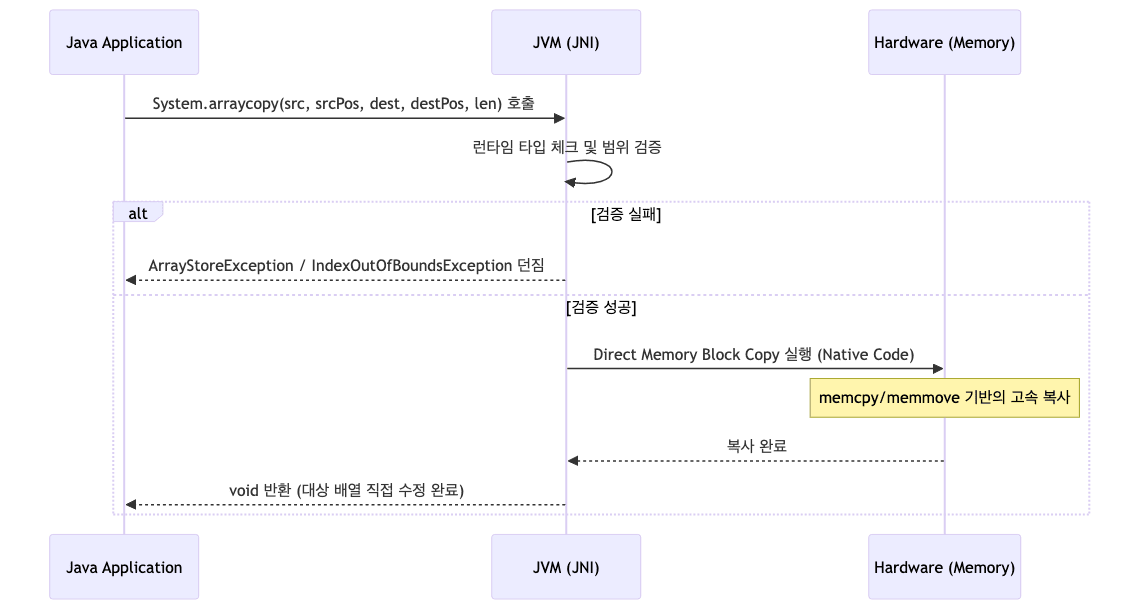
- 호출 단계
- Java 애플리케이션에서
System.arraycopy()호출 - JVM이 JNI를 통해 네이티브 코드 실행
- Java 애플리케이션에서
- 검증 단계
- 런타임 타입 체크
- 원본과 대상 배열의 타입 호환성 확인
- 범위 검증
- 인덱스와 길이가 배열 범위 내에 있는지 확인
- 검증 실패 시 예외 발생
ArrayStoreExceptionIndexOutOfBoundsException
- 런타임 타입 체크
- 복사 단계
- 하드웨어 메모리로 직접 블록 복사 실행
memcpy/memmove기반 고속 복사- SIMD 명령어 활용 가능
- 완료 단계
- 복사 완료 후
void반환 - 대상 배열이 직접 수정됨
- 복사 완료 후
결론
System.arraycopy는 Java에서 가장 빠른 배열 복사 방법- 네이티브 메서드로 JVM 레벨 최적화 제공
- 부분 복사와 같은 배열 내 복사 등 유연한 기능 지원
ArrayList내부 구현 등 Java 표준 라이브러리에서 광범위하게 사용- 대용량 데이터 처리 시 성능 향상에 필수적
- 얕은 복사 특성과 예외 처리를 이해하고 사용 필요